
Update guide
Razer Synapse Update: 5 Checks Before You Reinstall
Use this guide when Razer Synapse is already installed and you need to update it, verify an update prompt, or recover from an update that appears stuck.
Razer says Synapse updates normally install automatically in the background. A dashboard prompt appears when the app needs a restart, so downloading another installer should be the last step, not the first.
Quick answer
How a Razer Synapse Update Works in 2026
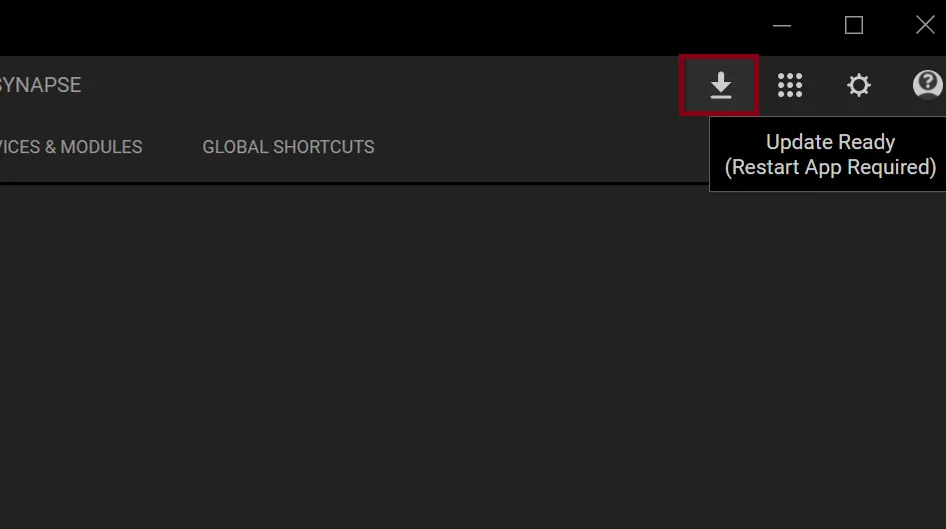
For most Synapse 4 users, there is no separate daily update routine. Razer's support article, updated May 13, 2026, says software updates install automatically in the background. When a release is ready to finish, the dashboard shows an update icon and a message that the app must restart. Save any profile changes, allow the restart, and reopen Synapse before assuming the update failed.
This page is about updating an existing installation. It does not replace the Razer Synapse 4 download guide for a first installation, and it does not treat device firmware as the same thing as the Synapse desktop app. Keeping those jobs separate prevents unnecessary uninstalls and avoids third-party driver or installer mirrors.
What you see
Best next action
Do not do first
Update Ready prompt
Restart Synapse and reopen it
Download a mirror EXE
No prompt, app works
Leave background updates enabled
Force a clean reinstall
App will not open
Restart Windows, then repair
Install Synapse 3 over Synapse 4
Latest official Windows builds
Current Razer Synapse 4 and Chroma versions checked October 24, 2026
Razer Insider's latest public Windows release note, dated October 21, 2026, lists Synapse 4.0.86.2610200951 and Chroma 4.0.63.2610020954. It also says full Synapse 4 support on Windows 10 ended October 14, 2026; through October 12, 2027, Windows 10 bug fixes are limited to security updates. We checked the product page and release note on October 24. The stable official EXE endpoint returned HTTP 200, application/x-msdownload, and 14,923,464 bytes. Its Last-Modified header remains September 8, 2026; we did not verify a checksum or a build number embedded in the file.
Five checks
How to Update Razer Synapse Without Losing the Problem
Start with observable state rather than an installer search. Confirm that Synapse opens, note whether you are using Synapse 4 or the legacy Synapse 3 branch, and look for the update icon near the top-right controls. The official example labels the state as Update Ready and says a restart is required. That is a completion prompt, not evidence that the application is corrupt.
Before restarting, finish edits to macros, DPI stages, lighting, linked games, or audio profiles. After the app returns, reconnect one Razer device and confirm its page loads. If the prompt disappears and normal device controls return, the update workflow completed; you do not need to download the installer again just to prove the version changed.
Identify the branch
Confirm whether the installed app is Synapse 4 or legacy Synapse 3 before changing files or profiles.
Look for the prompt
Check the dashboard update icon; background updates may have already downloaded the release.
Save configuration work
Finish or note important macros, DPI, Chroma, game links, and device settings before restart.
Restart once
Use the prompt, let Synapse close normally, and wait for the app and Razer App Engine to return.
Verify one device
Open a device page, test one setting, and confirm the update prompt is no longer waiting.
Choose the right updater
Synapse App Update vs Razer Driver or Firmware Update
A Synapse app update changes the desktop software and its modules. A device firmware update changes code on a specific mouse, keyboard, headset, controller, dock, or other peripheral. Windows driver state is a third layer. A search for razer driver update therefore should not automatically lead to a Synapse reinstall, because the correct source depends on the device model and the problem you can reproduce.
Use the app's background update for ordinary Synapse changes. Use a model-specific Razer support page when release notes or a support case names firmware. Use Windows Update and Device Manager only for Windows device state. Avoid generic driver-cleaner downloads: the official Razer Driver Clean-up Tool belongs in a documented clean-reinstall workflow, not in every routine update.
Update type
Changes
Source to use
Synapse 4 app
Desktop app, modules, fixes, features
Synapse background update or Razer installer
Device firmware
Code on one supported Razer device
Model-specific Razer support page
Windows driver
How Windows identifies the hardware
Windows Update, Device Manager, or Razer support
Troubleshooting
What to Do When a Razer Synapse Update Is Stuck
A stuck-looking update can be a slow restart, a blocked background service, a network interruption, or an app window that reopened behind another window. Give the first restart time to finish, then check Task Manager for Razer Synapse and Razer App Engine before clicking the prompt repeatedly. Repeated forced closes can turn a recoverable update into a partial installation.
If Synapse still cannot reopen, restart Windows and try once as an administrator. Check that system date and time are correct and that a firewall, VPN, proxy, endpoint-security rule, or storage shortage is not blocking the download or replacement files. When the app opens but a device is missing, switch to the device-detection guide instead of assuming the update package itself is bad.
Use repair or a clean reinstall only after these checks fail. Download the current installer from Razer's stable CDN or product page, close Razer apps, remove the installed app through Windows, restart, and install one Synapse branch. Do not install Synapse 3 and Synapse 4 concurrently as an experiment; Razer recommends Synapse 4 and warns that parallel versions can create configuration conflicts.
Wait for one clean restart
Do not click the update prompt repeatedly while background components are replacing files.
Restart Windows
Clear a blocked app process and let Razer services start in the normal Windows sequence.
Check network and security
Confirm time, free storage, firewall, VPN, proxy, and antivirus rules are not blocking Razer.
Separate device errors
If only one device is missing, troubleshoot USB and detection before reinstalling the whole app.
Reinstall last
Use one verified Razer installer and one version branch only after repair checks fail.
Latest official Windows builds
Current Razer Synapse 4 and Chroma versions checked October 24, 2026
Razer Insider's latest public Windows release note, dated October 21, 2026, lists Synapse 4.0.86.2610200951 and Chroma 4.0.63.2610020954. It also says full Synapse 4 support on Windows 10 ended October 14, 2026; through October 12, 2027, Windows 10 bug fixes are limited to security updates. We checked the product page and release note on October 24. The stable official EXE endpoint returned HTTP 200, application/x-msdownload, and 14,923,464 bytes. Its Last-Modified header remains September 8, 2026; we did not verify a checksum or a build number embedded in the file.
Update guide
Official Sources Checked
These Razer-owned pages support the update behavior, Synapse 4 status, compatibility, and verified download facts in this guide.
Razer update instructions
Automatic background update behavior and the official restart prompt.
Razer Synapse 4 Support & FAQs
Current Synapse 4 support, update, migration, and compatibility context.
Razer Synapse & Chroma for Windows — October 21, 2026 release notes
Official release record: Synapse 4.0.86.2610200951, Chroma 4.0.63.2610020954, and a device-detection fix.
Razer Synapse & Chroma for Windows — October 21, 2026 release notes
Official release note: Synapse 4.0.86.2610200951 and Chroma 4.0.63.2610020954; Windows 10 is now limited to security updates.
Razer Synapse & Chroma for Windows — October 21, 2026 release notes
Razer CDN installer verified HTTP 200, application/x-msdownload, 14,923,464 bytes on October 24, 2026.
FAQ
Razer Synapse Update FAQ
Does Razer Synapse update automatically?
Yes. Razer's May 13, 2026 support article says software updates install automatically in the background. A dashboard prompt appears when the app needs a restart.
How do I update Razer Synapse 4?
Let the background update download, look for the Update Ready icon, save configuration work, restart the app once, and confirm a device page loads after Synapse returns.
Why is my Razer Synapse update stuck?
Common causes include a slow restart, blocked Razer App Engine process, network or security filtering, incorrect system time, or low storage. Restart Windows and check those conditions before reinstalling.
Is a Razer driver update the same as a Synapse update?
No. Synapse updates the desktop app; firmware changes one device; Windows drivers control device recognition. Use the source that matches the layer that failed.
What is the latest Razer Synapse version?
Razer's latest public Windows release note, dated October 21, 2026, lists Synapse 4.0.86.2610200951 and Chroma 4.0.63.2610020954. We verified it on October 24. The stable installer endpoint is versionless and its checksum was not verified.